


Webhooks
Create webhook endpoints to receive real-time events — endpoint setup, event types, signing secrets, delivery history, and payload inspection.
Webhooks push real-time events — incoming customer messages, message delivery status, and form submissions — to your own server as HTTP POST requests. Integrate with a CRM, trigger automation, or build custom analytics without polling.
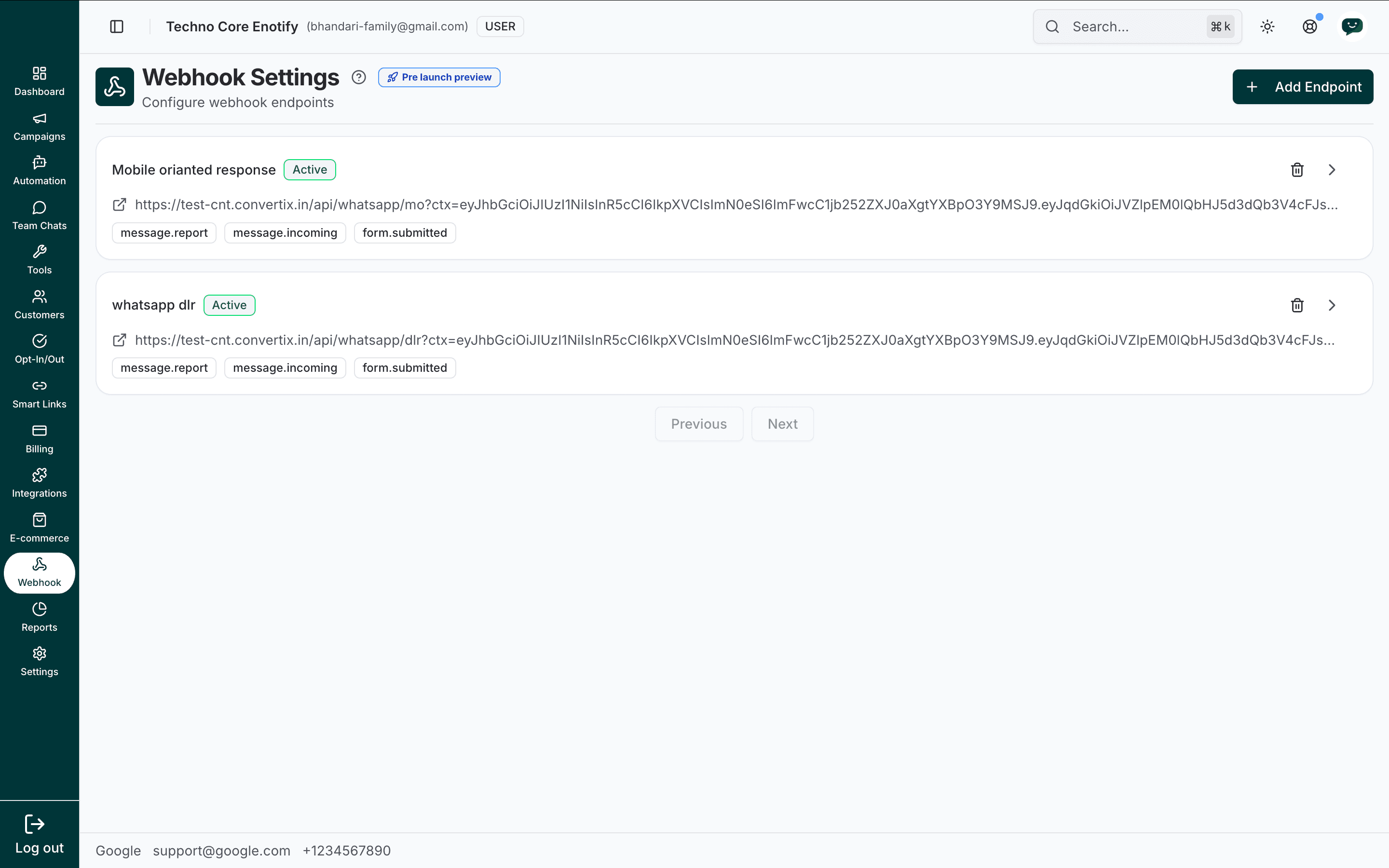
In the app: Dashboard → Webhook
Pre-launch preview
Webhooks are marked Pre launch preview. Behaviour and payload schema may change before general availability — pin to event names rather than exact field order.
How webhooks work
An event occurs (e.g. a customer sends a message)
  → We send an HTTP POST to your endpoint URL
→ Your server processes it and responds with 200 OKEach endpoint must:
- Be publicly reachable over HTTPS
- Respond quickly (a few seconds at most)
- Return a
2xxstatus to acknowledge receipt
Failed deliveries are retried, and every attempt is recorded in the endpoint's message history.
Event types
An endpoint receives only the event types you subscribe it to. Three are available:
| Event type | When it fires |
|---|---|
message.incoming | A customer sends a message to your WhatsApp number |
message.report | A delivery status update for a message you sent (sent, delivered, read, or failed) |
form.submitted | A customer completes and submits a form |
The Webhook Settings page
The settings page lists every endpoint on your account. Each row shows:
- The endpoint name (its description) and an Active badge
- The destination URL, with a link icon to open it
- Event type tags for the events it is subscribed to
- A delete icon, and a chevron that opens the endpoint editor
Use Add Endpoint (top right) to create a new one. Long lists are paginated with Previous / Next.
Create an endpoint
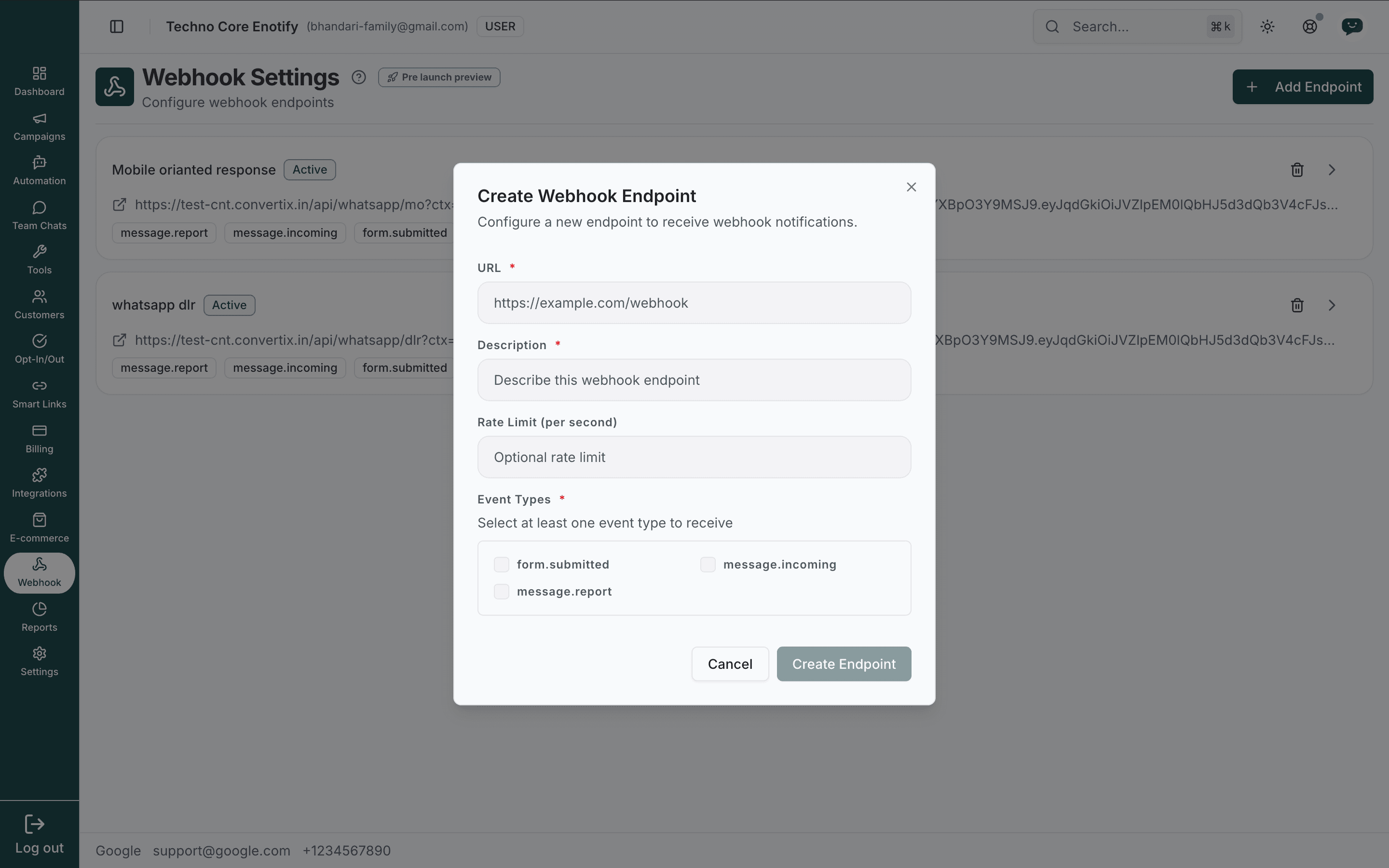
Fill in the endpoint details
| Field | Notes |
|---|---|
| URL (required) | The HTTPS endpoint that receives events, e.g. https://example.com/webhook |
| Description (required) | A label for the endpoint, shown as its name in the list |
| Rate Limit (per second) | Optional cap on deliveries per second. Leave blank for no limit |
Select event types
Under Event Types, tick at least one of form.submitted, message.incoming, and message.report. Only the selected events are delivered to this endpoint.
Create the endpoint
Click Create Endpoint. The new endpoint appears in the list, marked Active, with a signing secret generated automatically.
Edit an endpoint
Click the chevron on an endpoint row to open the Edit Endpoint screen. From here you can change every setting, inspect deliveries, and remove the endpoint.
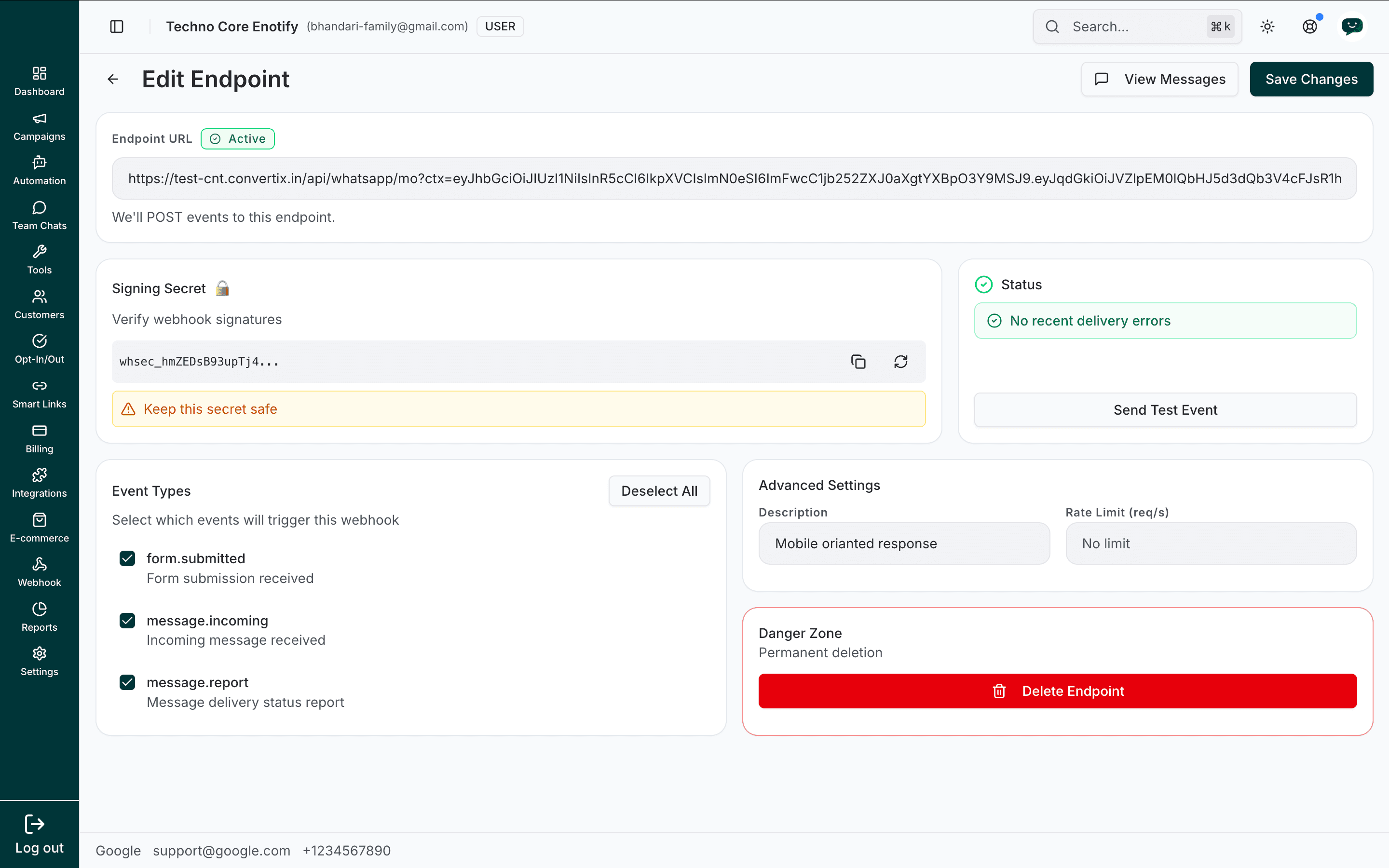
Endpoint URL
The destination we POST events to, with its Active status. Edit the URL here if your server moves.
Signing secret
Each endpoint has a secret (prefixed whsec_) used to verify that requests genuinely came from us. Use the copy icon to copy it, or the regenerate icon to roll it.
Keep this secret safe
Store the signing secret server-side only. Regenerating it immediately invalidates the previous secret, so update your server before rolling it.
Status
Shows recent delivery health, for example No recent delivery errors. Use Send Test Event to deliver a sample payload to your endpoint and confirm it is wired up correctly.
Event types
Toggle which events trigger this webhook. Deselect All clears every checkbox; at least one must stay selected.
Advanced settings
- Description — the endpoint's display name
- Rate Limit (req/s) — deliveries per second, or No limit
Save or delete
Click Save Changes (top right) to apply edits. The Danger Zone holds Delete Endpoint for permanent removal.
Delete an endpoint
Delete from the endpoint list (trash icon) or from the Danger Zone in the editor. A confirmation dialog appears first.
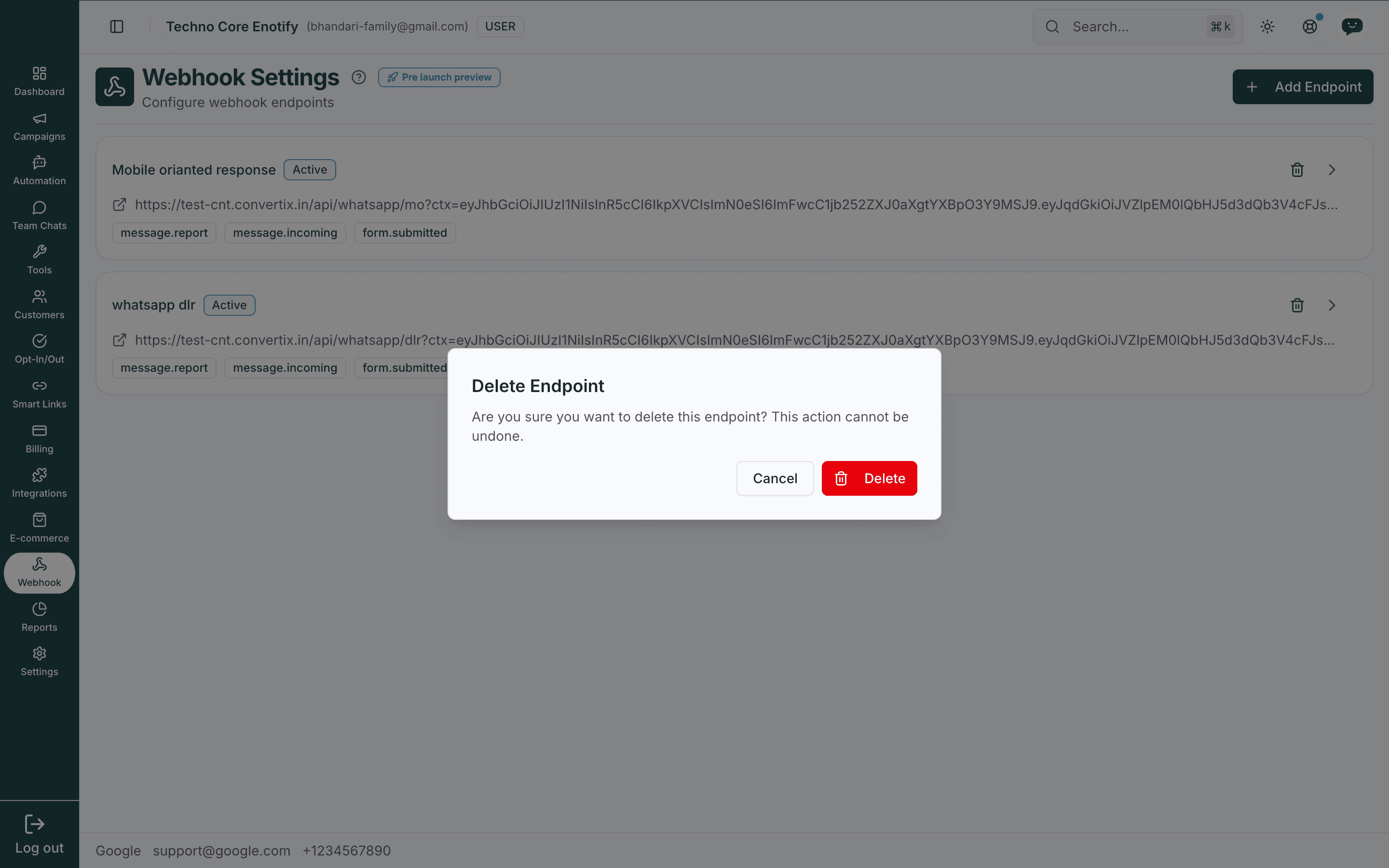
Deletion is permanent
Deleting an endpoint stops all deliveries to it and removes its message history. This cannot be undone.
Message history
From the Edit Endpoint screen, click View Messages to open Message History — every delivery attempt made to that endpoint.
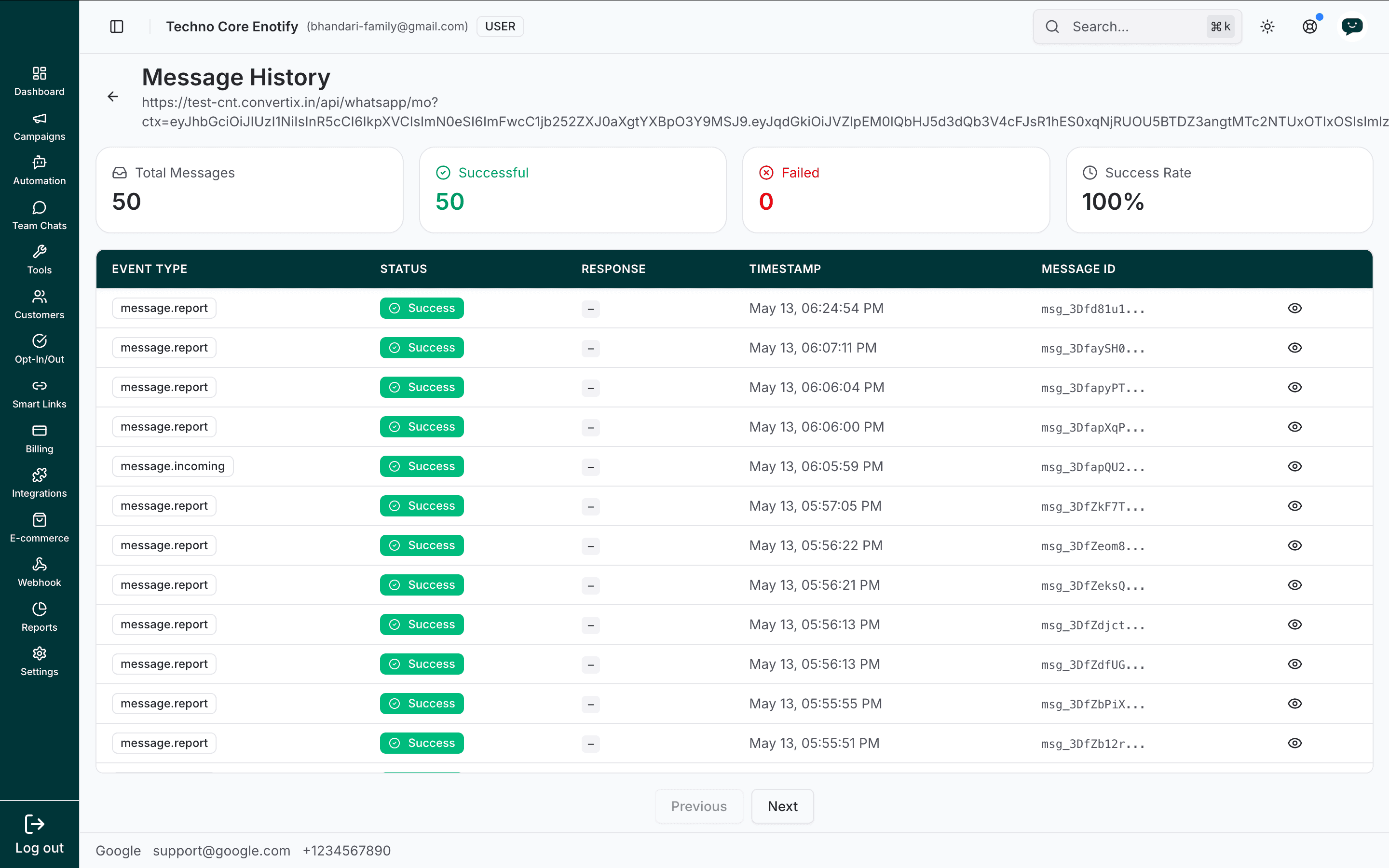
The summary cards at the top show Total Messages, Successful, Failed, and Success Rate. The table lists each delivery with:
| Column | Meaning |
|---|---|
| Event Type | The event that triggered the delivery |
| Status | Success or a failure indicator |
| Response | The HTTP response your server returned |
| Timestamp | When the delivery was attempted |
| Message ID | The unique ID of the event |
Use Previous / Next to page through history.
Inspect a payload
Click the eye icon on any row to open the Message payload panel. It shows the full delivery record — the JSON body that was POSTed, the response your server returned, and delivery metadata such as event ID, timestamp, and tags.
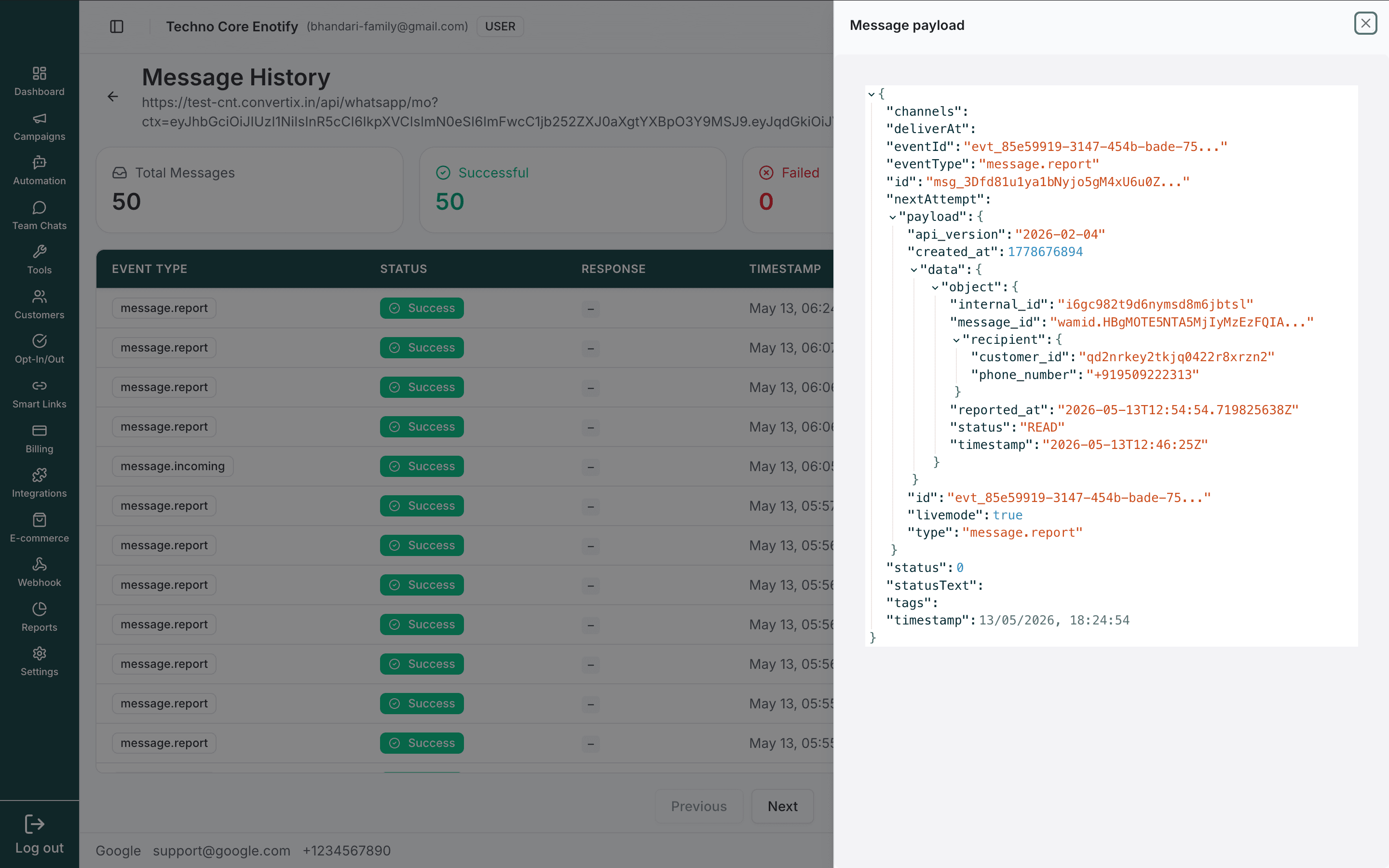
This is the fastest way to debug a failed delivery: compare what was sent against what your server expected.
Event payload structure
Each event is delivered as a JSON POST body. The shape is consistent across event types — a top-level envelope plus a data.object that carries the event-specific detail.
{
  "id": "evt_85e59919-3147-454b-bade-75...",
  "type": "message.report",
  "api_version": "2026-02-04",
  "created_at": 1747147674,
  "liveMode": true,
  "data": {
    "object": {
      "recipient": {
        "customer_id": "wamid.HBgN...",
        "phone_number": "+918189222313"
      },
      "status": "READ",
      "template_name": "order_confirmation",
      "reported_at": "2026-05-13T12:54:54.719Z",
      "timestamp": "2026-05-13T12:46:25Z"
    }
  }
}For template messages, message.report includes data.object.template_name when available, across all delivery statuses. The field is omitted for non-template messages or when the template name cannot be resolved. If the message was sent with a campaign_id (see API campaigns), data.object.campaign_id carries that id. To act on confirmed delivery, filter for DELIVERED (or READ as proof of delivery) and deduplicate by message_id.
For message.incoming the data.object carries the inbound message; for form.submitted it carries the submitted form fields. The exact schema is visible in the Message payload panel and in a Send Test Event delivery — use those as the source of truth.
WhatsApp Flow submissions
A completed WhatsApp Flow arrives as an ordinary inbound message, so it needs no separate
subscription — message.incoming delivers it. The message carries
content.message_type: "flow_response":
{
  "type": "message.incoming",
  "data": {
    "object": {
      "message_id": "wamid.HBgN...",
      "content": {
        "message_type": "flow_response",
        "flow_response": {
          "flow_token": "order-8891",
          "name": "flow",
          "body": "Sent",
          "data": {
            "screen_0_Name": "Manjit",
            "screen_0_Rating": "5"
          }
        }
      },
      "sender": {
        "phone_number": "918898593059",
        "customer_id": "..."
      }
    }
  }
}flow_token is whatever you set when you sent the Flow, echoed back unchanged — use it to match
the submission to the order, booking, or ticket it belongs to. data holds the customer's answers
keyed by screen field.
If Meta sends a payload we cannot decode, data is omitted and raw_json carries the original
string instead. The message is still delivered, so handle that case rather than assuming data is
always present.
Verifying webhook signatures
Use the endpoint's signing secret to confirm each request is authentic. Compute an HMAC-SHA256 of the raw request body and compare it against the signature header.
const crypto = require('crypto');

function verifySignature(rawBody, signature, secret) {
  const expected = crypto
    .createHmac('sha256', secret)
    .update(rawBody)
    .digest('hex');
  return crypto.timingSafeEqual(
    Buffer.from(signature),
    Buffer.from(expected)
  );
}

app.post('/webhook', (req, res) => {
  const signature = req.headers['x-webhook-signature'];
  const valid = verifySignature(req.rawBody, signature, process.env.WEBHOOK_SECRET);

  if (!valid) return res.status(401).send('Invalid signature');

  // Process the event...
  res.status(200).send('OK');
});
import hmac, hashlib
def verify_signature(raw_body: bytes, signature: str, secret: str) -> bool:
expected = hmac.new(secret.encode(), raw_body, hashlib.sha256).hexdigest()
return hmac.compare_digest(signature, expected)
@app.route('/webhook', methods=['POST'])
def webhook():
signature = request.headers.get('X-Webhook-Signature')
if not verify_signature(request.data, signature, os.environ['WEBHOOK_SECRET']):
return 'Invalid signature', 401
# Process the event...
return 'OK', 200Use the raw body
Compute the HMAC on the exact bytes received, before any JSON parsing or re-serialisation, or the signature will not match.
Use cases
| Use case | How to set it up |
|---|---|
| CRM sync | Subscribe to message.incoming and message.report, then push events into your CRM |
| Team alerts | Subscribe to message.incoming, forward to a Slack or Teams incoming webhook |
| Lead capture | Subscribe to form.submitted, create a record per submission |
| Delivery monitoring | Subscribe to message.report, alert when failure rates climb |
| Custom analytics | Subscribe to all events, store them, and build your own dashboards |
Troubleshooting
How is this guide?